
Serial Peripheral Interface (SPI)

Collapse
This is a sticky topic.
X
X
 
  • Giờ
  • Show
Clear All
new posts
  • falleaf
    PIC Bang chủ
    • May 2005
    • 2627

    #1

    Serial Peripheral Interface (SPI)

    Giao tiếp SPI có lẽ đã rất quen thuộc và đơn giản với tất cả những người làm vi điều khiển. Tuy nhiên, trong chiến dịch tập trung vào việc giải quyết các chức năng của dsPIC, F mở ra hàng loạt luồng, trong đó F và anh Nam, cũng như các MOD sẽ có nhiệm vụ hiểu chỉnh các bài đầu tiên, và trích lọc các ý kiến của các bạn trong luồng, tập hợp thành một bộ tutorial cho dsPIC thật hoành văn thị tráng.

    Mời các bạn thảo luận về vấn đề giao tiếp SPI trong dsPIC

    Tài liệu tham khảo:
    [1] Section 20. Serial Peripheral Interface (SPI) - dsPIC User Guide
    [2] Datasheet dsPIC30F6010A(*)

    Chúc vui

    (*) Do diễn đàn chúng ta hơi thiên về khuynh hướng điều khiển, và bản thân Microchip cũng thiên về khuynh hướng này một cách rõ rệt, nên F sử dụng các tài liệu tham khảo là datasheet của 6010A.
    Công ty TNHH Thương mại và Giao nhận R&P
    store.hn@rpc.vn - store.hcm@rpc.vn

    Học PIC như thế nào?
  • falleaf
    PIC Bang chủ
    • May 2005
    • 2627

    #2
    1. Những chân liên quan trong giao tiếp SPI:
    • SDIx:
    • SDOx:
    • SCKx:
    • /SSx:


    Chờ các đồng chí giải thích chức năng của từng chân rồi F sẽ thêm vào đây.


    2. Những thanh ghi có liên quan trong giao tiếp SPI:

    Các thanh ghi cần tương tác trong module SPI
    • SPIxBUF:
    • SPIxSTAT:
    • SPIxCON:


    Các thanh ghi quản lý ngắt
    • IFSn:
    • IECn:
    • IPCn:


    Lại chờ các đồng chí giải thích


    3. Quy trình thiết lập giao tiếp SPI cho một dsPIC:


    Lưu ý: Những gì có thể tham khảo chi tiết, các bạn đọc tại Datasheet của dsPIC mà mình đang làm việc, hoặc dsPIC User Manual. Ở đây chúng ta chỉ thảo luận để nhận diện các vấn đề, trang bị kiến thức cơ sở cho người mới học, chúng ta không đi quá sâu vào chi tiết, nhưng F khuyến khích các bạn cung cấp những đoạn code mẫu và các thông tin liên quan để giải thích.

    Khi các bạn post bài bên dưới, F sẽ quote các bài của các bạn để đưa lên bài đầu tiên (giữ nguyên tên tác giả của bài viết), và sẽ có điều chỉnh một số chỗ cho nó thống nhất về cách hành văn của bài viết này.


    Tài liệu tham khảo:


    Chúc vui
    Công ty TNHH Thương mại và Giao nhận R&P
    store.hn@rpc.vn - store.hcm@rpc.vn

    Học PIC như thế nào?

    Comment

    • falleaf
      PIC Bang chủ
      • May 2005
      • 2627

      #3
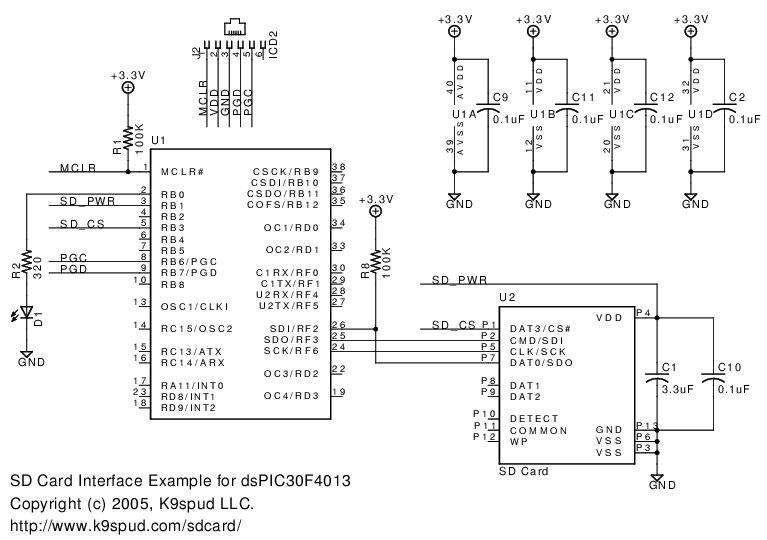
      Giao tiếp dsPIC30F4013 với SD card

      Mạch nguyên lý:

      Mạch nguyên lý đơn giản này có thể được sử dụng, tuy nhiên các bạn có thể tham khảo thêm phần thiết kế mạch chuẩn cấp nguồn và reset trong ICD2 Manual, ngoài ra các bạn có thể thêm thắt các giao tiếp hoặc hiển thị khác để kiểm tra và thử nghiệm.


      Source code:

      Bộ source code và file hex đầy đủ có thể download bên dưới

      Code:
      #include "p30f4013.h"


      _FOSC(CSW_FSCM_OFF & FRC_PLL4);
      
      _FWDT(WDT_OFF);
      
      _FBORPOR(PBOR_OFF & BORV_20 & PWRT_64 & MCLR_EN);
      
      _FGS(CODE_PROT_OFF);


      #define LED PORTBbits.RB0
      
      #define LED_DIR TRISBbits.TRISB0


      #define SD_PWR PORTBbits.RB1
      
      #define SD_PWR_DIR TRISBbits.TRISB1
      
      #define SD_CS PORTBbits.RB3
      
      #define SD_CS_DIR TRISBbits.TRISB3


      #define SDI PORTFbits.RF2
      
      #define SDI_DIR TRISFbits.TRISF2
      
      #define SCK PORTFbits.RF6
      
      #define SCK_DIR TRISFbits.TRISF6
      
      #define SDO PORTFbits.RF3
      
      #define SDO_DIR TRISFbits.TRISF3


      #define SD_PowerOn() SD_PWR = 1
      
      #define SD_PowerOff() SD_PWR = 0
      
      #define SD_Enable() SD_CS = 0 /* set low to activate SD Card chip select */
      
      #define SD_Disable() SD_CS = 1 /* set high to deactivate SD Card chip select */


      void SPIWrite(unsigned char data)
      
      {
      
      	// DO NOT WAIT FOR SPITBF TO BE CLEAR HERE
      
      	// (for some reason, it doesn't work on this side of the write data).


      	// Write the data!
      
      	SPI1BUF = data;


      	// Wait until send buffer is ready for more data.
      
      	while(SPI1STATbits.SPITBF);
      
      }


      unsigned char SPIRead(void)
      
      {
      
      	unsigned char data;


      	if(SPI1STATbits.SPIRBF)
      
      	{
      
      		// already have some data to return, don't initiate a read
      
      		data = SPI1BUF;


      		SPI1STATbits.SPIROV = 0;
      
      		return data;
      
      	}


      	// We don't have any data to read yet, so initiate a read
      
      	SPI1BUF = 0xFF;  // write dummy data to initiate an SPI read
      
      	while(SPI1STATbits.SPITBF); // wait until the data is finished reading
      
      	data = SPI1BUF;


      	SPI1STATbits.SPIROV = 0;
      
      	return data;
      
      }


      void InitSPI(void)
      
      {
      
      	SD_PowerOff();
      
      	SD_PWR_DIR = 0;	 // output
      
      	SD_PowerOff();


      	SD_Disable();
      
      	SD_CS_DIR = 0; // output
      
      	SD_Disable();


      	SDI_DIR = 1; // input
      
      	SCK_DIR = 1;
      
      	SDO_DIR = 1;


      	SPI1STAT = 0x8000; // enable SPI port


      	// set SPI port to slowest setting
      
      	// master mode
      
      	// 8 bit
      
      	// Idle state for Clock is high level
      
      	// Primary prescaler 64:1
      
      	// Secondary prescaler 8:1
      
      	SPI1CON = 0x0060;
      
      }


      // primary prescaler 1:1
      
      // secondary prescaler 1:1
      
      #define SPIFastClock() SPI1CON = 0x007F


      // SD Card SPI Commands are defined in the SanDisk SD Card Product Manual v1.9 
      
      // section 5.2.2.1 (page 91 of PDF)
      
      // http://www.sandisk.com/pdf/oem/ProdManualSDCardv1.9.pdf
      
      //
      
      // 0 - GO_IDLE_STATE - Resets the SD Card
      
      // 1 - SEND_OP_COND - Activates the card's initialization process
      
      // 9 - SEND_CSD				Asks card to send card-specific data
      
      // 10 - SEND_CID			Asks card to send card identification
      
      // 12 - STOP_TRANSMISSION	Forces card to stop transmission during multi-block read
      
      // 13 - SEND_STATUS			Asks card to send its status register.
      
      // 16 - SET_BLOCKLEN		Selects block length for all subsequent block commands (default is 512)
      
      // 17 - READ_SINGLE_BLOCK	Reads a block of the size specified by SET_BLOCKLEN
      
      // 18 - READ_MULTIPLE_BLOCK	Continuously transfers data until interrupted by STOP_TRANSMISSION
      
      // 24 - WRITE_BLOCK			Writes a block of the size specified by SET_BLOCKLEN
      
      // 25 - WRITE_MULTI_BLOCK 	Continuously writes blocks of data until a stop transmission token is sent instead of start block token.


      // R1 Response Codes (from SD Card Product Manual v1.9 section 5.2.3.1)
      
      #define R1_IN_IDLE_STATE    (1<<0)   // The card is in idle state and running initializing process.
      
      #define R1_ERASE_RESET      (1<<1)   // An erase sequence was cleared before executing because of an out of erase sequence command was received.
      
      #define R1_ILLEGAL_COMMAND  (1<<2)   // An illegal command code was detected
      
      #define R1_COM_CRC_ERROR    (1<<3)   // The CRC check of the last command failed.
      
      #define R1_ERASE_SEQ_ERROR  (1<<4)  // An error in the sequence of erase commands occured.
      
      #define R1_ADDRESS_ERROR    (1<<5)  // A misaligned address, which did not match the block length was used in the command.
      
      #define R1_PARAMETER        (1<<6)  // The command's argument (e.g. address, block length) was out of the allowed range for this card.
      
      // R1 bit (1<<7) is always 0
      
      unsigned char SD_WriteCommand(unsigned char* cmd)
      
      {
      
      	unsigned int i;
      
      	unsigned char response;
      
      	unsigned char savedSD_CS = SD_CS;


      	// SD Card Command Format
      
      	// (from Section 5.2.1 of SanDisk SD Card Product Manual v1.9).
      
      	// Frame 7 = 0
      
      	// Frame 6 = 1
      
      	// Command (6 bits)
      
      	// Address (32 bits)
      
      	// Frame 0 = 1


      	// Set the framing bits correctly (never change)
      
      	cmd[0] |= (1<<6);
      
      	cmd[0] &= ~(1<<7);
      
      	cmd[5] |= (1<<0);


      	// Send the 6 byte command
      
      	SD_Enable();
      
      	for(i = 0; i < 6; ++i)
      
      	{
      
      		SPIWrite(*cmd);
      
      		cmd++;
      
      	}


      	// Wait for the response
      
      	i = 0;
      
      	do
      
      	{
      
      		response = SPIRead();


      		if(i > 100)
      
      		{
      
      			break;
      
      		}
      
      		i++;
      
      	} while(response == 0xFF);


      	SD_Disable();


      	// Following any command, the SD Card needs 8 clocks to finish up its work.
      
      	// (from SanDisk SD Card Product Manual v1.9 section 5.1.8)
      
      	SPIWrite(0xFF); 


      	SD_CS = savedSD_CS;
      
      	return(response);
      
      }


      unsigned char InitSD()
      
      {
      
      	unsigned int i = 0;
      
      	unsigned char status;


      	// Turn off SD Card
      
      	SD_Disable();
      
      	SD_PowerOff();


      	// Wait for power to really go down
      
      	for(i = 0; i; i++);
      
      	for(i = 0; i; i++);
      
      	for(i = 0; i; i++);
      
      	for(i = 0; i; i++);


      	// Turn on SD Card
      
      	SD_PowerOn();


      	// Wait for power to really come up
      
      	for(status = 0; status < 10; ++status)
      
      	{
      
      		for(i = 0; i; i++);
      
      		for(i = 0; i; i++);
      
      		for(i = 0; i; i++);
      
      		for(i = 0; i; i++);
      
      	}


      	// We need to give SD Card about a hundred clock cycles to boot up
      
      	for(i = 0; i < 16; ++i)
      
      	{
      
      		SPIWrite(0xFF); // write dummy data to pump clock signal line
      
      	}	


      	SD_Enable();


      	// This is the only command required to have a valid CRC
      
      	// After this command, CRC values are ignore unless explicitly enabled using CMD59
      
      	unsigned char CMD0_GO_IDLE_STATE[] = {0x00,0x00,0x00,0x00,0x00,0x95};


      	// Wait for the SD Card to go into IDLE state
      
      	i = 0;
      
      	do
      
      	{
      
      		status = SD_WriteCommand(CMD0_GO_IDLE_STATE);


      		// fail and return
      
      		if(i++ > 50)
      
      		{
      
      			return 1;
      
      		}
      
      	} while( status != 0x01 );


      	// Wait for SD Card to initialize
      
      	unsigned char CMD1_SEND_OP_COND[] = {0x01,0x00,0x00,0x00,0x00,0xFF};


      	i = 0;
      
      	do
      
      	{
      
      		status = SD_WriteCommand(CMD1_SEND_OP_COND);
      
      		if(i++ > 50)
      
      		{
      
      			return 2;
      
      		}
      
      	} while( (status & R1_IN_IDLE_STATE) != 0 );


          // Send CMD55, required to precede all "application specific" commands
      
      	unsigned char CMD55_APP_CMD[] = {55,0x00,0x00,0x00,0x00,0xFF};
      
      	status = SD_WriteCommand(CMD55_APP_CMD); // Do not check response here


      	// Send the ACMD41 command to initialize SD Card mode (not supported by MMC cards)
      
      	i = 0;
      
      	unsigned char ACMD41_SD_SEND_OP_COND[] = {41,0x00,0x00,0x00,0x00,0xFF};
      
      	do
      
      	{
      
      		status = SD_WriteCommand(ACMD41_SD_SEND_OP_COND);
      
      		// Might return 0x04 for Invalid Command if MMC card is connected


      		if(i++ > 50)
      
      		{
      
      			return 3;
      
      		}
      
      	} while( (status & R1_IN_IDLE_STATE) != 0 );


      	// Set the SPI bus to full speed now that SD Card is initialized in SPI mode
      
      	SD_Disable();
      
      	SPIFastClock();


      	return 0;
      
      }


      // SD Card defaults to 512 byte block size
      
      #define BLOCK_SIZE 512
      
      unsigned char SD_ReadBlock(unsigned long addr, unsigned char *buf)
      
      {
      
      	unsigned int i;
      
      	unsigned char status;


      	unsigned char CMD17_READ_SINGLE_BLOCK[] = {17,0x00,0x00,0x00,0x00,0xFF};
      
      	CMD17_READ_SINGLE_BLOCK[1] = ((addr & 0xFF000000) >> 24);
      
      	CMD17_READ_SINGLE_BLOCK[2] = ((addr & 0x00FF0000) >> 16);
      
      	CMD17_READ_SINGLE_BLOCK[3] = ((addr & 0x0000FF00) >> 8);
      
      	CMD17_READ_SINGLE_BLOCK[4] = ((addr & 0x000000FF));


      	SD_Enable();


      	// Send the read command
      
      	status = SD_WriteCommand(CMD17_READ_SINGLE_BLOCK);
      
      	if(status != 0)
      
      	{
      
      		// ABORT: invalid response for read single command
      
      		return 1;
      
      	}


      	// Now wait for the "Start Block" token	(0xFE)
      
      	// (see SanDisk SD Card Product Manual v1.9 section 5.2.4. Data Tokens)
      
      	do
      
      	{
      
      		status = SPIRead();
      
      	} while(status != 0xFE);


      	// Read off all the bytes in the block
      
      	for(i = 0; i < BLOCK_SIZE; ++i)
      
      	{
      
      		status = SPIRead();
      
      		*buf = status;
      
      		buf++;
      
      	}


      	// Read CRC bytes
      
      	status = SPIRead();
      
      	status = SPIRead();


      	SD_Disable();


      	// Following a read transaction, the SD Card needs 8 clocks after the end 
      
      	// bit of the last data block to finish up its work.
      
      	// (from SanDisk SD Card Product Manual v1.9 section 5.1.8)
      
      	SPIWrite(0xFF); 


      	return 0;
      
      }


      unsigned char buf[512];


      int main (void)
      
      {
      
      	unsigned int i, j;
      
      	ADPCFG = 0xFFFF; // Force all ADC pins as digital I/O


      	// Configure output pins
      
      	LED_DIR = 0;
      
      	LED = 1;


      	InitSPI();
      
      	unsigned char status;
      
      	status = InitSD();
      
      	do
      
      	{
      
      		while(status)
      
      		{
      
      			status = InitSD();
      
      			LED = 0;
      
      		};


      		status = SD_ReadBlock(0, buf);
      
      	} while(status);


      	i = 0; //reset counter
      
      	while(1)
      
      	{
      
      		LED = i & 1;


      		if(i & 1)
      
      		{
      
      			for(j = 0; j < 40000; ++j);
      
      		}
      
      		else
      
      		{
      
      			for(j = 0; j < 65000; ++j);
      
      		}


      		i++;
      
      		if(i == 15)
      
      			i = 0;
      
      	}


      	return 0;
      
      }

      Mua ở đâu?
      - Hiện nay những loại card SD cũ tương đối rẻ, có thể tìm mua tại các tiệm bán hàng điện thoại di động cũ ở Việt Nam. Giá tham khảo cho một card 32M là khoảng 100K.
      - Các sản phẩm Microchip và linh kiện khác có thể mua tại R&P


      Tài liệu tham khảo:


      Chúc vui
      Attached Files
      Last edited by falleaf; 12-11-2007, 10:44 AM.
      Công ty TNHH Thương mại và Giao nhận R&P
      store.hn@rpc.vn - store.hcm@rpc.vn

      Học PIC như thế nào?

      Comment

      • rhinoceros
        Đệ tử 1 túi
        • Jul 2007
        • 17

        #4
        Chào bác F.em mới chập chững bước vào nghề ,vẫn chưa hiểu nhiều lắm về mấy thứ muốn hỏi bác và mọi người
        + khi giao tiêp thẻ nhớ với uC thì người ta thường sử dụng chuẩn định dạng FAT16,FAT32 để có thể tương thích được với windown.và việc thay đổi nội dung sẽ diễn ra đơn giản hơn.
        với chuẩn định dạng FATxx thì em lấy code mẫu của mấy bác rồi.vẫn chưa hiểu rõ lắm nhưng sẽ cố gắng để có thể làm được
        với thẻ nhớ thì cần phải có những thao tác gì để có thể nói chuyện được với nó ?
        thẻ nhớ ngày xưa với bây giờ cũng khác nhau nhiều về dung lượng và công nghệ.không biết bây giờ em đi mua 1 chiếc thẻ nhớ SD khoảng 1G về để làm thì có khác gì với thẻ nhớ SD 32MB trước không ?

        Comment

        • bien_van_khat
          ...Damned...
          • Apr 2006
          • 503

          #5
          Bạn tham khảo thread này
          - Xin đọc trước khi post bài

          Xin đặt code trong thẻ [ code ] [ /code ]

          Comment

          • minhhung_FT
            Đệ tử 1 túi
            • Sep 2012
            • 12

            #6
            ban nao co code giao tiep the SD voi PIC6F khong share cho minh voi.
            Minh nghien cuu mai ma khong ghi doc duoc the SD cac ban oi.
            tks alot,

            Comment

            • minhhung_FT
              Đệ tử 1 túi
              • Sep 2012
              • 12

              #7
              Sory, PIC16F.
              Minh da mua cai module doc the nho kieu SPI ve roi ma chua biet lam.
              Mong cac ban help voi.
              tks nhiu,

              Comment

              Working...